Introduction
Entertainment has changed significantly over the past few years. Instead of relying only on traditional cable television, people now watch movies, television shows, documentaries, sports, and online videos through streaming services. Smart TVs and streaming devices have made it easier to enjoy digital entertainment from the comfort of home.
One popular option in this market is Apple TV. Apple’s entertainment platform provides access to original shows, movies, streaming applications, and other digital content. Depending on the product or service you choose, you can enjoy entertainment through a dedicated streaming device or directly through a compatible television, phone, tablet, or computer.
For people who already use Apple products, this platform can offer a convenient way to bring their entertainment together. However, new users may wonder how it works, what features it provides, and whether it is worth the investment.
This guide explains everything you need to know about Apple TV, including its main features, benefits, subscription options, compatibility, and important considerations before getting started.
What Is Apple TV?
Apple TV is the name associated with Apple’s home entertainment ecosystem. It includes a streaming device called Apple TV 4K, the Apple TV app, and Apple TV+, a subscription service featuring original entertainment.
Although these names sound similar, they serve different purposes.
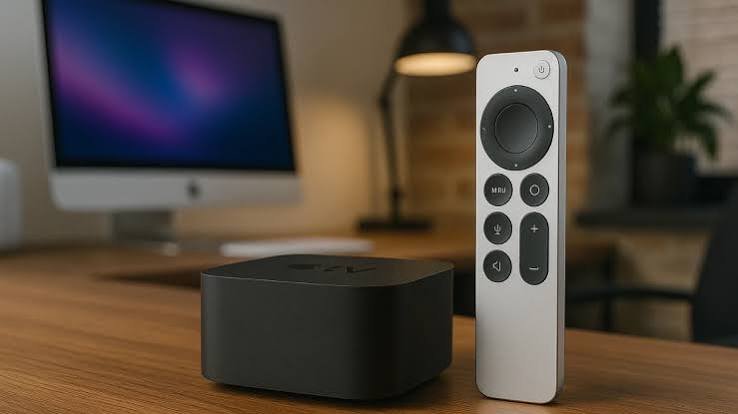
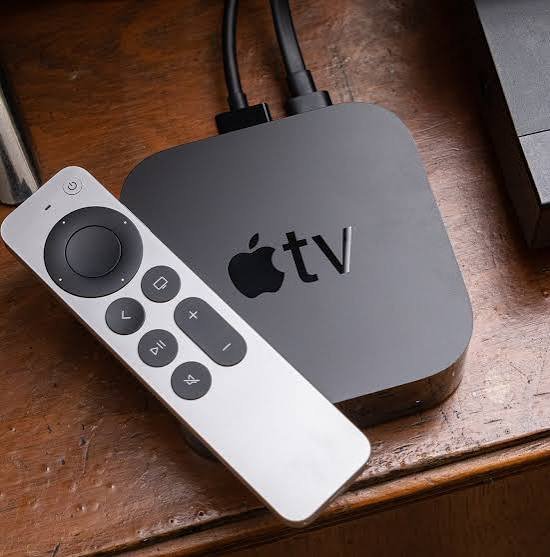
Apple TV 4K: A physical streaming box that connects to a television through HDMI.
Apple TV app: An application that helps users discover, access, and watch supported video content.
Apple TV+: A subscription streaming service offering Apple Original films, series, documentaries, and other programming.
Understanding these differences helps you choose the right option for your needs. You do not necessarily need to purchase a streaming box to watch content through the Apple TV app or subscribe to Apple TV+.
For example, someone with a compatible smart TV may be able to install the app and watch supported content without buying additional hardware. Someone with an older television may prefer a dedicated streaming device to access modern entertainment features.
The best choice depends on your television, internet connection, budget, and preferred streaming services.
Main Features of Apple TV
The platform offers several features designed to make watching digital entertainment simple, comfortable, and enjoyable. The exact features available depend on whether you use the streaming box, the app, or the subscription service.
1. High-Quality 4K Streaming
One of the main advantages of the Apple TV 4K device is its support for high-resolution entertainment. Compatible models can deliver 4K video, which provides more detail than standard Full HD content.
When paired with a compatible television, suitable streaming content, and a reliable internet connection, viewers can enjoy sharp images, rich colours, and a more immersive viewing experience.
Some supported content also offers HDR formats, such as Dolby Vision, for improved contrast and colour. Dolby Atmos audio is available with compatible equipment and content on supported setups.
However, picture and sound quality depend on several factors, including your television, speakers, streaming subscription, internet speed, and the version of the device you own.
2. Apple Original Movies and TV Shows
Apple TV+ offers a collection of original productions, including dramas, comedies, documentaries, films, and family entertainment.
Rather than depending entirely on licensed programmes from other studios, Apple invests in exclusive content produced for its service. This gives subscribers access to titles they may not find on other streaming platforms.
The catalogue changes over time as new programmes arrive and existing content becomes available in different regions. Before subscribing, check the current catalogue in your country to make sure it includes the shows and movies you want to watch.
3. Access to Streaming Applications
A dedicated streaming device can provide access to compatible entertainment applications through its app store. Depending on regional availability, these may include video-on-demand services, music applications, and other entertainment platforms.
This makes it easier to use several services on one television without constantly switching between different devices.
Keep in mind that some applications require separate accounts or subscriptions. Purchasing a streaming box does not automatically unlock every movie, television channel, or premium service.
4. Siri Voice Control
Compatible Apple TV devices support Siri, Apple’s voice assistant. With supported languages and configurations, users can search for programmes, open applications, and control playback using voice commands.
For example, you may be able to ask Siri to find a particular film or search for a show featuring a favourite actor.
Voice control can be especially useful when you do not want to type long titles using an on-screen keyboard. Availability varies by country, language, device model, and software version.
5. Integration With Apple Devices
People who already own an iPhone, iPad, or Mac may appreciate the way Apple’s entertainment products work together.
Depending on your device and configuration, you can use an iPhone as a remote control, share compatible content through AirPlay, or use supported Apple services across multiple devices.
This integration can make everyday tasks more convenient. For example, you might discover a video on your phone and then play compatible content on your television.
These features are particularly helpful for households that already use Apple’s ecosystem.
How Does Apple TV Work?
Getting started is relatively simple, although the process differs depending on the product you choose.
Setting Up the Streaming Device
If you purchase an Apple TV 4K box, follow these basic steps:
Connect the device to your television using a compatible HDMI cable.
Connect the power cable and turn on your television.
Select the correct HDMI input on your TV.
Follow the on-screen setup instructions.
Connect to your home Wi-Fi network or a supported wired network.
Sign in with your Apple Account when required.
Install compatible applications and sign in to your preferred streaming services.
Once setup is complete, you can explore the interface, open applications, search for content, and begin watching.
For the best experience, use a stable internet connection and keep the device’s software updated.
Using the Apple TV App Without Buying a Box
You may not need additional hardware if your television or another device already supports the Apple TV app.
Check your television’s app store or the official Apple website to confirm compatibility. If the app is available, install it, sign in where required, and explore the content offered in your region.
The app’s available features depend on the platform you use. Some functions may be different on a smart TV, web browser, mobile device, or dedicated streaming box.
This flexibility makes it easier for new users to try Apple’s entertainment services before deciding whether to purchase additional equipment.
Apple TV vs. Apple TV+: What Is the Difference?
Many people confuse Apple’s streaming hardware with its subscription service. Although they are connected, they are not the same product.
Feature | Apple TV 4K | Apple TV+ |
|---|---|---|
Product type | Physical streaming device | Subscription streaming service |
Main purpose | Brings streaming apps to a television | Provides Apple Original content |
Requires separate hardware purchase | Yes, for the dedicated box | No, if you have a compatible device |
Internet connection | Needed for most streaming features | Needed for streaming |
Content access | Depends on installed apps and subscriptions | Depends on the service catalogue and plan |
Can be used with other devices | Works with a compatible TV | Available through supported devices and platforms |
The simplest way to understand the difference is that the streaming box is a piece of hardware, while Apple TV+ is a service for watching original entertainment.
You can purchase the hardware without subscribing to Apple’s streaming service. Likewise, you may be able to subscribe to the service without owning the streaming box.
This distinction is important when comparing costs and deciding which option suits your household.
Benefits of Using Apple TV
There are several reasons people consider adding Apple’s entertainment products to their homes.
A Simple and Clean Interface
A clear interface can make it easier to find applications, browse entertainment, and resume programmes. The experience is designed to help users move between supported services without needing to learn a complicated system.
The exact interface and available features can change with software updates and the device being used.
A Better Home Entertainment Experience
When connected to compatible equipment, Apple TV 4K can support high-resolution video and advanced audio formats. This can make films and television shows more enjoyable, especially on a good television with a suitable sound system.
You do not necessarily need expensive equipment to benefit from streaming, but compatible hardware helps you make the most of supported picture and sound features.
Convenient Device Integration
Apple users can benefit from features such as AirPlay and supported remote-control options. These functions can reduce the effort required to share content or manage playback.
For households with several Apple devices, this integration may be more valuable than it would be for someone who uses products from many different brands.
A Wide Range of Entertainment Choices
A compatible streaming device gives you access to multiple applications in one place. You can switch between films, television shows, children’s programming, music, and other supported content.
The range of available applications depends on your location and the services you use. Some platforms also require individual subscriptions.
Useful Features for Families
Families may appreciate parental controls, content restrictions, and other settings available through supported devices and services.
These options can help parents manage what children can access. It is still important to review the settings carefully because controls may differ between individual streaming applications.
Apple TV Price and Subscription Costs
Cost is an important factor when deciding whether Apple’s entertainment ecosystem is right for you. The total expense depends on whether you want the physical streaming box, a subscription, or both.
Streaming Device Price
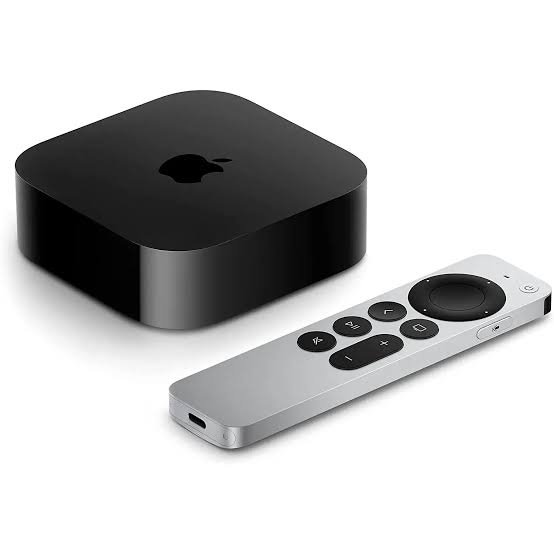
The Apple TV 4K is a premium streaming device. Its retail price can vary depending on the model, storage configuration, seller, and country.
In Pakistan, buyers should also consider import costs, warranty coverage, and differences between official retail channels and independent sellers. Prices may vary significantly between shops and online marketplaces.
Before buying, compare the price of the exact model, check whether the seller offers a genuine product, and confirm which accessories are included.
Apple TV+ Subscription
Apple TV+ requires a paid subscription unless you qualify for a promotional offer or another eligible arrangement. Subscription prices and trial offers can change, and availability differs by region.
You should check the current price displayed for your country before subscribing. Also remember that a subscription to Apple TV+ does not automatically include every third-party streaming service or paid movie available through the Apple TV app.
Is It Worth the Money?
Whether the cost is justified depends on your viewing habits.
If you regularly watch streaming content, value a simple interface, and want advanced picture and sound support, a dedicated streaming device may be a worthwhile investment.
However, if your smart TV already runs your favourite applications smoothly, you might not need to purchase extra hardware. You could begin by checking whether the Apple TV app is available on your existing devices.
For budget-conscious buyers, comparing the cost of the device with the features they will actually use is the best approach.
Apple TV Compatibility and Requirements
Before purchasing a streaming product, make sure it works with your existing equipment.
Television Compatibility
The Apple TV 4K device connects to a compatible television using HDMI. A 4K television is required to enjoy the full resolution offered by 4K output, although compatible configurations can work with lower-resolution televisions.
For the best picture quality, check that your television supports the resolution and HDR formats you intend to use.
Internet Connection
Most streaming content requires an internet connection. A stable broadband connection helps reduce buffering and interruptions.
High-resolution video generally requires more bandwidth than standard-definition streaming. If several people in your home use the internet at the same time, your connection speed and network quality become especially important.
Apple Account
Some features and services require an Apple Account. You may also need to sign in separately to third-party applications.
If you are setting up a device for the first time, make sure your account information is correct and that you can access any required verification methods.
Compatible Accessories
Depending on your setup, you may need an HDMI cable, a reliable Wi-Fi network, and compatible audio equipment.
Do not assume that every cable or accessory supports every feature. Check the specifications of your particular model and connected devices before making additional purchases.
Apple TV for Gaming and Fitness
Although the platform is mainly associated with video streaming, supported Apple devices and services can offer additional entertainment options.
Casual Gaming
Compatible applications may provide casual games and other interactive experiences. The selection depends on the device, software version, and regional availability.
For many users, this is a useful extra rather than a replacement for a dedicated gaming console. People who primarily want advanced console games should compare the available game libraries and controller support before choosing a platform.
Fitness and Wellbeing
Depending on the available services and your subscriptions, you may be able to access supported workout videos and fitness content on a larger screen.
Watching a guided workout on a television can make exercises easier to follow than viewing them on a small phone display.
Availability depends on your region, the apps you use, and the equipment you own. Check the current service requirements before subscribing.
Apple TV vs. Other Streaming Devices
The streaming market includes products from several companies, including Roku, Amazon, and Google. Each platform has its own strengths, pricing, interface, and application support.
Comparison | Apple’s streaming device | Budget streaming alternatives |
|---|---|---|
Price | Generally positioned in the premium segment | Often available at lower prices |
Video quality | Supports advanced formats on compatible models | Varies by model |
User experience | Integrated Apple-style interface | Varies by platform |
Ecosystem | Particularly useful for Apple users | May suit other device ecosystems |
Applications | Supports compatible streaming apps | Availability varies by device |
Best suited for | Users who value integration and premium features | Buyers prioritising price or specific platform features |
There is no single streaming device that is best for everyone.
If you already own several Apple products, the integration may justify the extra cost. If you only want to watch a few streaming services, an affordable device or your existing smart TV may be sufficient.
The right decision comes down to your budget, preferred applications, technical requirements, and the features you will actually use.
Tips for Getting the Best Streaming Experience
You can improve your viewing experience by following a few simple practices.
Use a Reliable Internet Connection
Place your Wi-Fi router in a suitable location and minimise obstacles where possible. If your connection is unstable, consider improving your home network or using a supported wired connection.
Choose the Right Display Settings
Check your television’s resolution, HDR capabilities, and picture settings. Select compatible output settings on your streaming device so that your equipment can deliver the best available quality.
Keep Software Updated
Software updates can introduce improvements, security fixes, and compatibility changes. Check for updates periodically and install them when appropriate.
Manage Your Subscriptions
Review your streaming subscriptions regularly. Cancel services you no longer use and check whether promotional plans renew at a higher price.
Remember that purchasing a streaming device does not mean all content is free. Movies, sports, and premium programmes may require separate purchases or subscriptions.
Protect Your Account
Use a strong password, keep your account recovery details up to date, and enable available security features. If multiple people share a household device, review purchasing permissions and parental controls where appropriate.
Common Problems and How to Fix Them
Like other streaming products, Apple TV can occasionally experience technical issues. Most common problems can be resolved with a few basic checks.
Streaming Videos Keep Buffering
Buffering is often related to a slow or unstable internet connection. Restart your router, check your connection speed, and pause other downloads if necessary.
If the problem affects only one application, check whether that service is experiencing an outage or requires an update.
The Device Is Not Connecting to the Television
Make sure the HDMI cable is securely connected and that your television is using the correct HDMI input. Try another compatible HDMI port if available.
If the screen remains blank, check the device’s power connection and consult the troubleshooting instructions for your particular model.
An Application Is Not Working
Close and reopen the application, check for updates, and restart the device if necessary. You may also need to sign in again or check your subscription status.
If the issue continues, consult the application’s official support information.
You Cannot Find a Particular Movie
Content availability varies by region, streaming service, and licensing agreement. A movie may be available to rent or purchase without being included in your subscription.
Check the title’s availability and the service offering it before assuming it is included at no additional cost.
Is Apple TV a Good Choice in 2026?
Apple’s entertainment ecosystem remains worth considering for people who want a convenient way to access digital content. Its combination of streaming applications, original programming, compatible smart-home features, and integration with Apple devices can make it attractive to many households.
However, choosing the right option requires understanding your needs. Some people will benefit from a dedicated streaming box, while others can enjoy the available services through a compatible smart TV or mobile device.
Before making a purchase, compare current prices, verify compatibility, and check whether your favourite applications and programmes are available in your region.
A little research can help you avoid paying for features you do not need while ensuring that your chosen setup delivers the entertainment experience you want.
Frequently Asked Questions
1. What is Apple TV used for?
It is used to access streaming applications, watch movies and television shows, and enjoy supported digital entertainment. The term can refer to Apple’s streaming device, its application, or its subscription service.
2. Is Apple TV free to use?
The Apple TV app may be available without an app-download fee on compatible devices, but individual content can require payment. Apple TV+ requires a subscription unless an eligible offer applies. The dedicated streaming box must be purchased separately.
3. Can I use Apple TV on a Samsung Smart TV?
Many compatible Samsung smart televisions support the Apple TV app. Availability depends on the television model, software, and region. Check your TV’s app store or manufacturer documentation to confirm support.
4. Do I need an iPhone to use Apple TV?
No. You can use compatible hardware or supported applications without owning an iPhone. However, some features may work more conveniently when you use other Apple devices.
5. Does Apple TV require Wi-Fi?
Most streaming features require an internet connection, usually through Wi-Fi or a supported wired connection. Some features may work differently depending on the device and content.
6. Can I watch Netflix on Apple TV?
Netflix is available through compatible Apple TV streaming devices in supported regions. You generally need a Netflix account and an appropriate subscription to watch its content.
7. Is Apple TV better than a regular Smart TV?
It depends on your needs. A dedicated streaming box may offer a different interface, performance, application support, or integration features. If your existing smart TV already meets your requirements, buying another device may not be necessary.
Conclusion
Choosing the right entertainment setup can make watching movies, television shows, and online content more enjoyable. Apple’s streaming ecosystem offers several options, from a dedicated 4K streaming device to an application and a subscription service featuring original productions.
Understanding the differences between these products is the first step toward making an informed decision. Consider your budget, television compatibility, internet connection, preferred streaming services, and the features you value most.
For users who appreciate a polished interface and integration with other Apple products, Apple TV can be a strong option. For others, a compatible smart TV or more affordable streaming device may provide everything they need.
Ultimately, the best choice is the one that fits your viewing habits, works with your existing equipment, and provides good value for your money.